What we're solving
- Around 11 instructor decks — main course, progress tests, the final, week-by-weeks
- ~1,000 grams between them, every one a hyperlinked tile
- Every gram: vessel name, an analysis sheet, one or more Lofar links — every Lofar pointing at a
.glc - Job: bring the lot into the same publication set as pub-9 and pub-10, and have it come out two ways — your version and the trainee's
(instructor / student)
What's a "gram"?
A small, self-contained training artifact:
- Title — vessel name, category, codename
- Analysis sheet — a Word document (
.docx) of measured values the analyst fills in from their GramFrame readings (bearing, base frequency, harmonics, shaft / blade rate, classification, ...), or a PNG screenshot of that same sheet - One or more Lofar links — always a hyperlink to a
.glcconfiguration file. The.glcin turn references the spectrogram asset GAPS-Lite would render: usually a.png/.jpgpre-rendered image (~82%), occasionally a.wavraw recording rendered live by the on-PC viewer (~18%).
Audited across 1,004 Lofar text-run hyperlinks: every one targets a .glc. The .wav case is always one indirection deeper, inside the GLC's data_source/filename.
A single gram tile, as seen on a legacy slide
Current state — a legacy slide
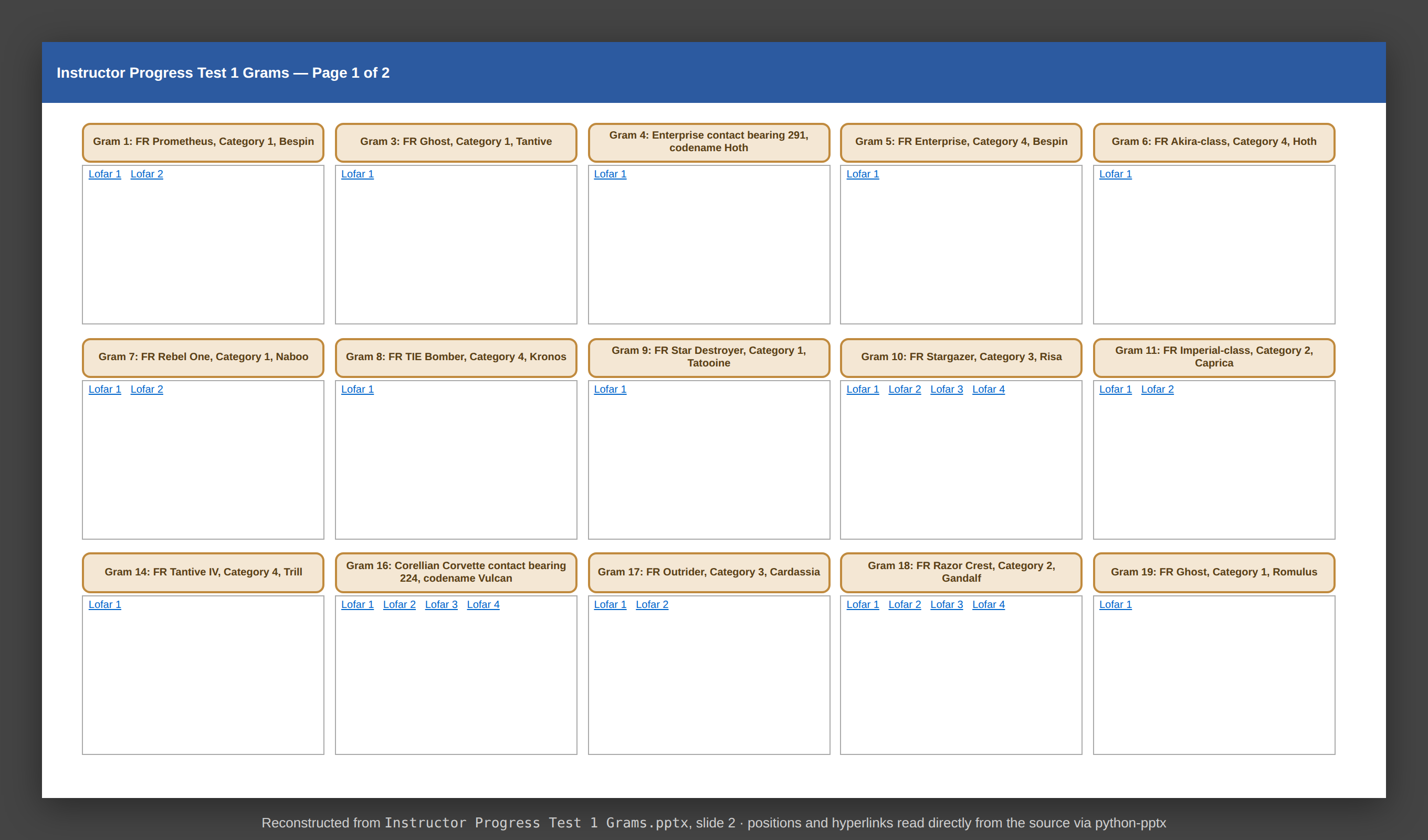
Reconstructed from Instructor Progress Test 1 Grams.pptx, slide 2.
15 gram tiles per slide. Each title and each Lofar label is a hyperlink to a file on disk.
Under the hood: what's actually in the .pptx
Excerpt from introspect_pptx.py — structural report of the real file
=== Section 1: Summary ===
Filename: Instructor Progress Test 1 Grams.pptx
Total slides: 4
Hyperlink target extensions:
  .docx: 19    ← analysis sheets
  .glc:  64    ← LOFAR configurations
  .png:  11    ← inline analysis images
Shape-level hyperlinks: 30   ← title boxes
Text-run hyperlinks:    64   ← "Lofar 1", "Lofar 2"...

-- Slide 2 (shapes: 31) --
  Rounded Rectangle 2  pos=(0.40,0.80) text='Gram 1: FR Prometheus, ...'
                       shape_hyperlink=...Files/Gram 1/Analysis Sheet.docx
  TextBox 3            pos=(0.40,1.22) text='Lofar 1 Lofar 2'
                       run[0]: hyperlink=...Files/Gram 1/Lofar 1.glc
                       run[1]: hyperlink=...Files/Gram 1/Lofar 2 I.glc
Two different hyperlink mechanisms per gram — shape-level for the title, run-level for individual labels. Both must be extracted faithfully.
Limitations of the current state
Hopping between decks to find a gram
Need to find a particular gram? You'd have to know which deck it's in before you start.
Every publication, duplicated end-to-end
Each of the ~10 publications exists twice over — instructor and student — not just the PPTX, but every shared asset it points at: spectrogram images, sound files, and .glc configs. Authors keep both copies in sync by hand; any edit risks drift across hundreds of files.
Links sat next to the decks
Every tile points at a file in the folder next door. Move the folder, rename it — links break and nothing tells you.
Yet another way of publishing content
Pub-9 and pub-10 already go through Oxygen. The grams come out of PowerPoint — different format, different workflow.
Before any code — a sample to work against
I didn't survey every deck. I pulled a random sample of content from across them, enough to see the patterns repeat. Off that sample I built an unclassified stand-in: fake vessel names, real structure. Safe to take off-site, faithful enough to work against — and that's what the script was written against.
Honest about the catch: real decks will show variance the sample didn't cover. Handling that variance is the work ahead.
The migration pipeline
extract_to_csv.pygenerate_dita.pypublish_html.py / OxygenFour production stages, plus introspect_pptx.py as a standalone diagnostic tool (it produced the report on the previous slide). Small Python scripts, one third-party dependency — designed to be debuggable on an air-gapped network.
What stays with the author — and what gets retired
What the author keeps
- The DITA document set — the deliverable, in the same format as pub-9 and pub-10
- The existing authoring workflow — Oxygen and DITA-OT, the routines already in use; no new tooling to learn
- The Operator Console v2 theme and GramFrame plugin — carried with the publication, applied on every future build
What gets retired
- The extractor, generator, and publish scripts — scaffolding built to run the conversion once
- The mock dataset — used to develop the conversion off-site
- The intermediate CSV — the sign-off record for the one conversion, archived rather than maintained
A one-way trip
This whole toolchain exists to produce a single, complete conversion from PowerPoint to DITA. Once that conversion is signed off, the toolchain has done its job — it isn't infrastructure to host, maintain, or learn. From there on, the grams are maintained in DITA, alongside the rest of the publication set, by the author.
Stage 1 — Extract to CSV
One row per Lofar (plus one per analysis sheet). Every row of a single gram shares the same topic_filename — the generator merges them downstream.
| publication | gram_id | vessel_name | topic_type | seq | topic_filename | time_end | freq_end |
|---|---|---|---|---|---|---|---|
| progress-test-1 | Gram 18 | FR Razor Crest, Category 2, Gandalf | glc | 1 | gram_18.dita | 180 | 200 |
| progress-test-1 | Gram 18 | FR Razor Crest, Category 2, Gandalf | glc | 2 | gram_18.dita | 271 | 100 |
| progress-test-1 | Gram 18 | FR Razor Crest, Category 2, Gandalf | glc | 3 | gram_18.dita | 300 | 800 |
| progress-test-1 | Gram 18 | FR Razor Crest, Category 2, Gandalf | glc | 4 | gram_18.dita | 360 | 200 |
| progress-test-1 | Gram 18 | FR Razor Crest, Category 2, Gandalf | analysis | 1 | gram_18.dita |
Gram 18 has four Lofars and one analysis sheet — five rows, one topic_filename. Today's CSV: 1,409 rows of this shape across 7 publications. The author edits this in Excel; the warnings column is where the next stage takes over.
Stage 2 — Human checkpoint ⭐ quality gate
The technical author opens the CSV in Excel and:
- Resolves any rows flagged with warnings (e.g. ambiguous LOFAR label, missing analysis sheet)
- Cross-checks
time_end/freq_endvalues for plausibility - Edits vessel names, sequencing, or chapter assignment as needed
- Saves — the file becomes the signed-off source of truth for generation
CSV is deliberately chosen because Excel is universal, diff-able under version control, and survives review-edit-review cycles without proprietary tooling. README documents the Excel save-as risks (BOM stripped, line endings flipped, leading zeros coerced) and a CSV round-trip test now guards the byte-level invariant.
Why this matters
Generation is deterministic from the CSV. Nothing gets into the published output that a human hasn't approved.
If something looks wrong in the published HTML, the fix is to correct the CSV and re-run — not to patch the output.
Stage 3 — Generate DITA
The N+1 CSV rows for a gram collapse into one DITA topic per gram: an Analysis Sheet section (instructor-only) followed by one section per Lofar, in CSV sequence order.
<topic id="gram_18">
  <title>Gram 18<ph audience="-trainee"> - FR Razor Crest, Category 2, Gandalf</ph></title>
  <body>
    <section audience="-trainee" outputclass="analysis-sheet">
      <title>Analysis Sheet</title>
      <image href="analysis.png" placement="break" align="center" />
    </section>
    <section outputclass="lofar-stage">
      <title>Lofar 1</title>       <!-- ← section heading lifted from the PPTX link label -->
      <table outputclass="gram-config">...time-end=180, freq-end=200, image=lofar-1.png...</table>
    </section>
    <section outputclass="lofar-stage">
      <title>Lofar 2</title>
      <table outputclass="gram-config">...time-end=271, freq-end=100, image=lofar-2.png...</table>
    </section>
    <!-- Lofar 3, Lofar 4 sections follow, one per CSV glc row -->
  </body>
</topic>
audience="-trainee" drives the dual-edition split — on the vessel-name decoration and on the whole Analysis Sheet section. Section titles ("Lofar 1", "Stage 1 — Broadband", ...) come straight from the PPTX link labels.
Stage 4 — Publish two editions
One DITA source tree, two DITA-OT passes:
- Instructor edition — no filter, full content.
- Student edition — DITA-OT run with
--filter=dita/trainee.ditaval, excluding every element taggedaudience="-trainee".
A shared landing page (html/index.html) lets the reader pick. URL paths below the edition segment are identical — swapping instructor/ ↔ student/ reaches the same gram in the other edition.
A Jest test sweep over html/student/ asserts zero case-insensitive occurrences of the string "instructor" in any rendered text or URL — the edition split is enforced by build, not by review.
html/
├── index.html                  ← shared landing
├── instructor/
│   ├── index.html
│   ├── main/
│   ├── progress-final-assessment/
│   ├── progress-test-1/  ...  progress-test-5/
└── student/
    ├── index.html
    ├── main/             ← --filter=trainee.ditaval
    ├── progress-final-assessment/
    ├── progress-test-1/  ...  progress-test-5/
Two editions, one source — side by side
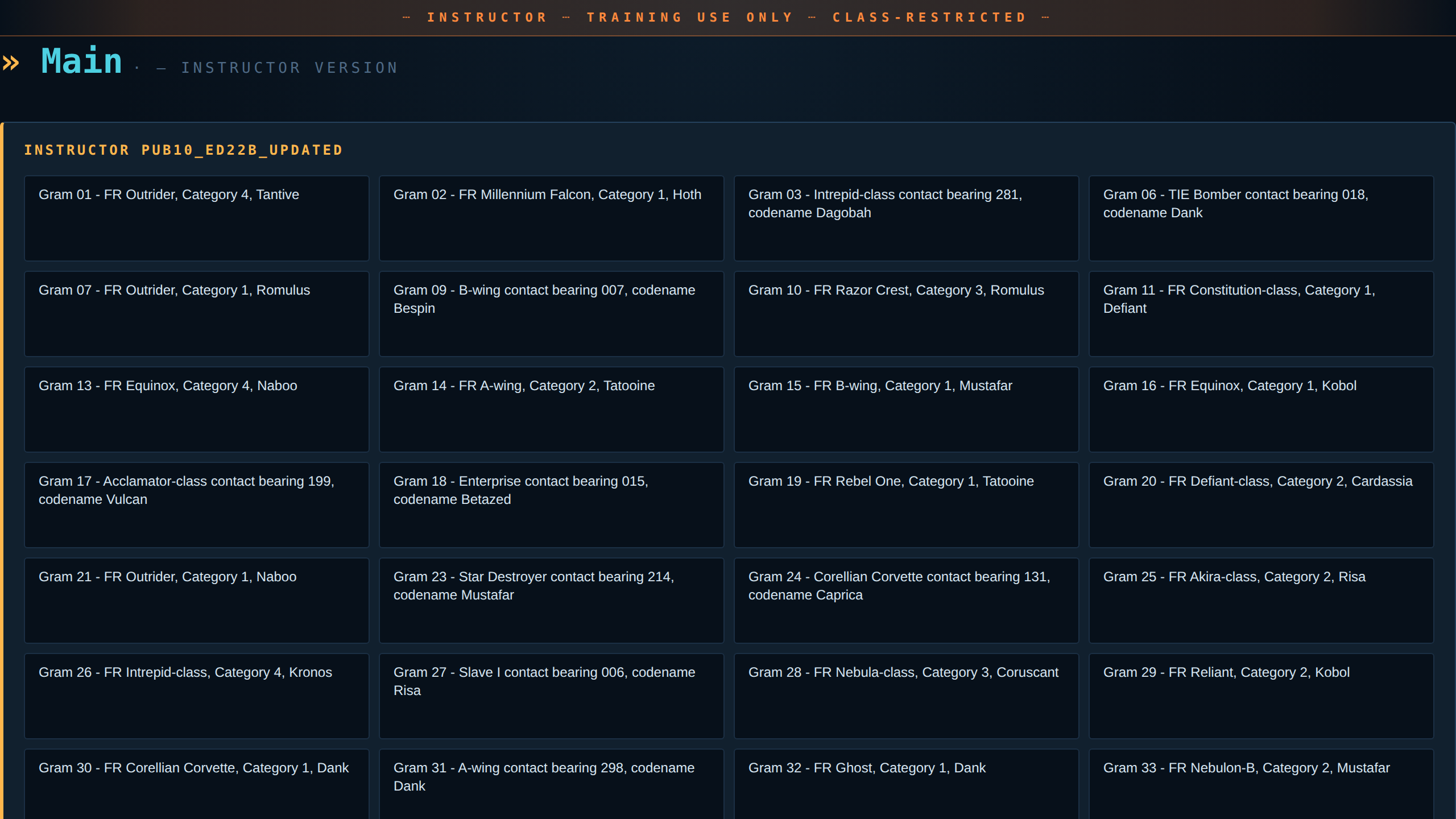
Instructor — every gram exposes vessel name, category, codename. The Analysis Sheet section is present on every topic.
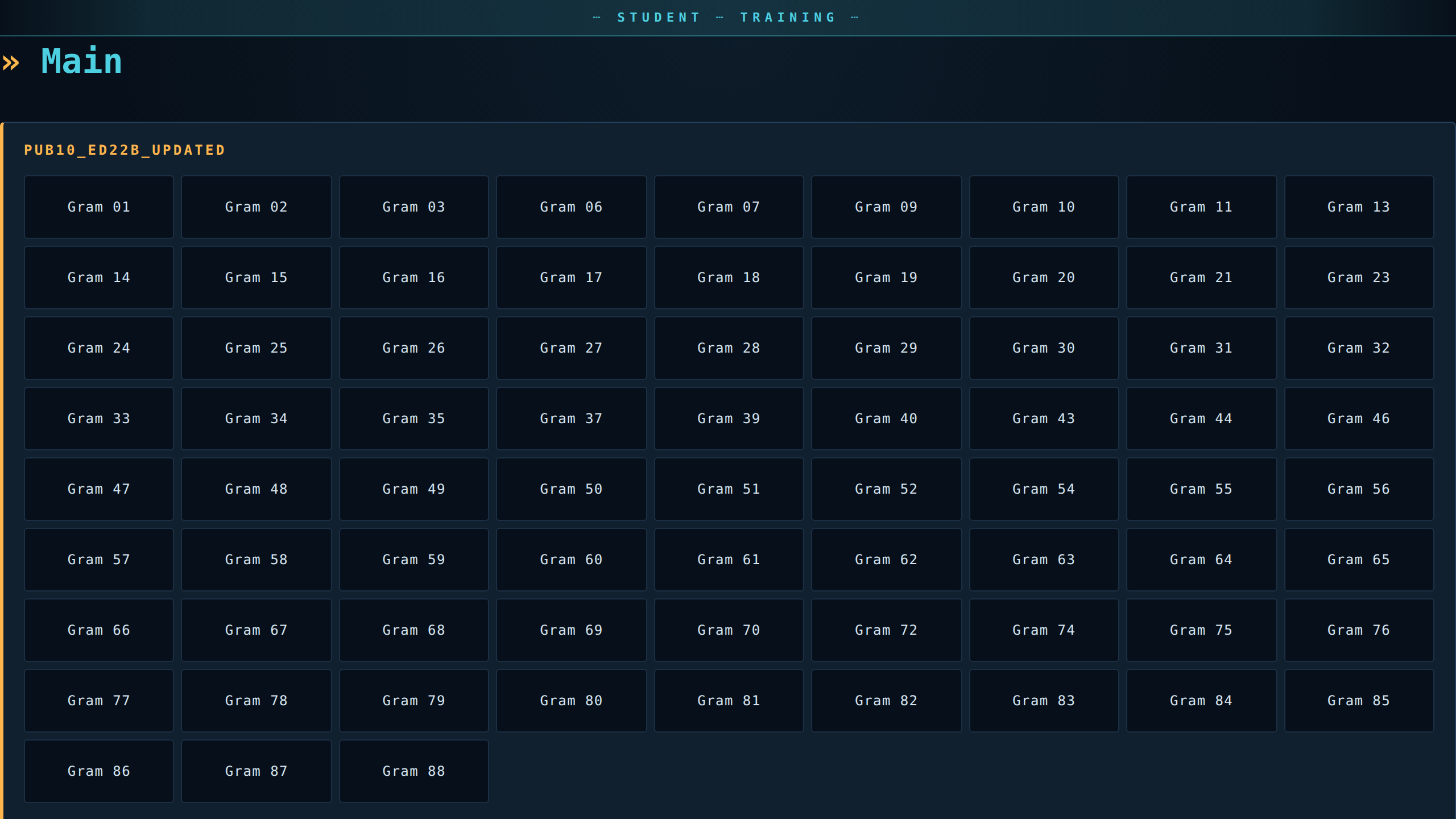
Student — same tree, same URLs, but vessel names are gone and Analysis Sheet sections are filtered out of every topic.
Styled for the operator — "Operator Console v2"
The default DITA-OT output is functional but plain. The themed output reads as a piece of equipment:
- Classification banner top and bottom — amber for instructor, cyan for student, so a glance at the page reveals which edition you're in
- Each Lofar section is a "trace" — a header bar with a session id, status LED, and CRT scanline overlay
- Engineering grid background, monospaced display fonts, monochromatic accents
- Drives off a single
data-editionattribute on<body>— one CSS file, no per-edition fork
The static gram-config tables in the DITA source are replaced at runtime by the GramFrame plugin (next slide) — what you see at right isn't just styling.
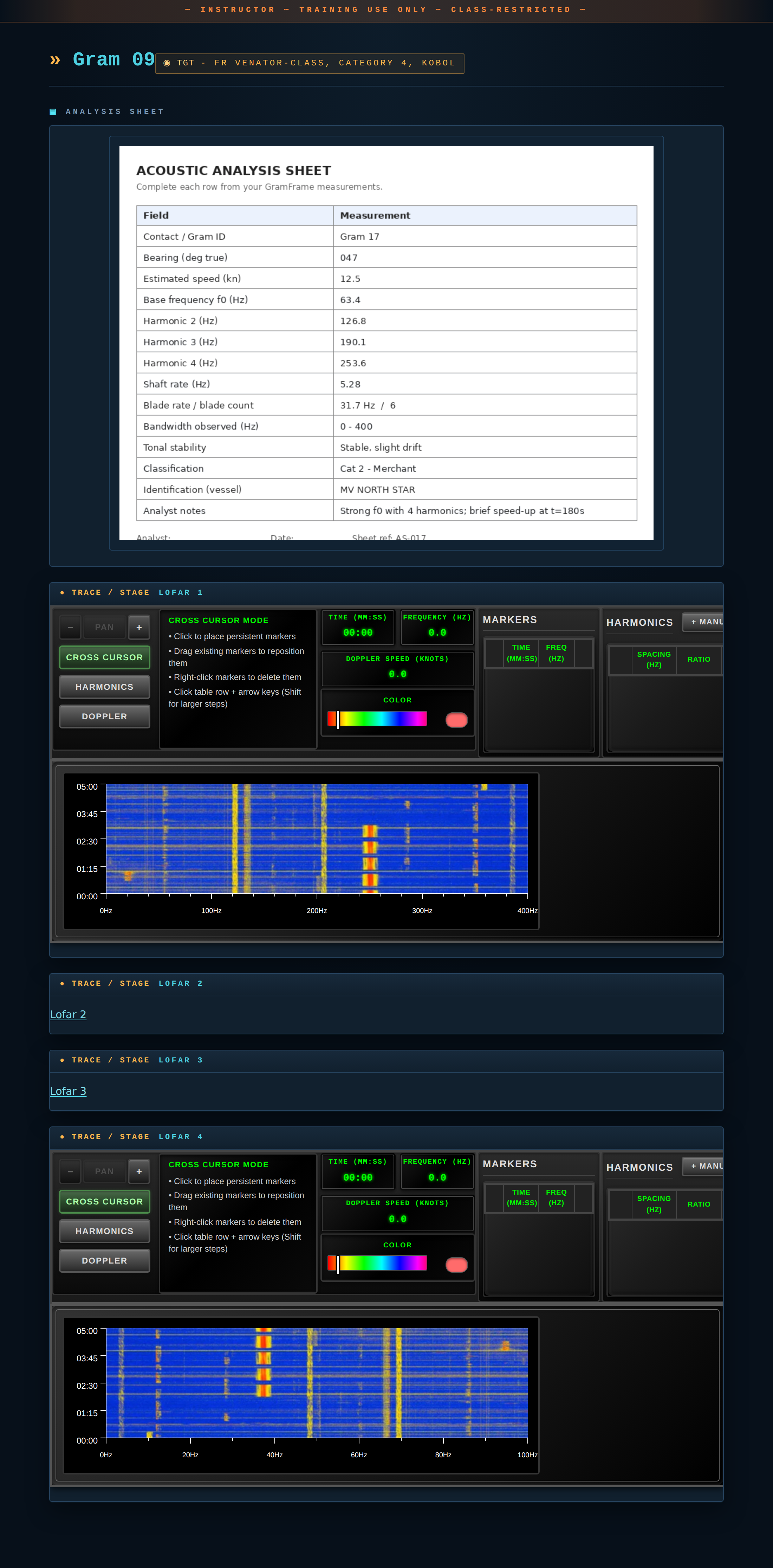
Gram 20, instructor edition — real screenshot of html/instructor/main/week-4-grams-updated/gram-20/.
GramFrame — analysis moves into the browser
Before — click out to GAPS-Lite
- PPTX → click
Lofar→ Windows launches the.glcin GAPS-Lite: separate non-intuitive app, dedicated training, trainee out of lesson context
After — inline GramFrame (~82% of links)
- Spectrogram renders inside the gram topic — same browser tab, no app launch
- GramFrame replaces each gram-config table with an interactive instrument: CURSOR / HARMONICS / DOPPLER modes, LED time/freq readouts, click-to-add markers
The ~18% WAV case still drops out to GAPS-Lite via the .glc link. Closing that gap is the next phase — video under GramFrame, enabling aural analysis without leaving the browser.
Live GramFrame instruments rendered inline inside one HTML page.
Live demo — a single gram, instructor edition
Gram 18 — the five CSV rows from slide 8 merged into one topic: Analysis Sheet, then four live GramFrame instruments.
Same gram, student edition
Same URL path, just student/ instead of instructor/. Vessel name and Analysis Sheet gone, banner flips to cyan — one source, filtered at publish.
Live demo — browse the publication set
Shared landing page → per-edition index → per-publication index → gram topic. This is the actual generator output, served straight from the repo.
Benefits at a glance
Searchable, all in one place
One publication set, ~1,000 grams, all cross-referenced. Find a gram by vessel, category or codename without knowing which deck it lives in.
Two versions, one source
Instructor edition shows the vessel name; trainee edition doesn't. Same source, can't drift out of sync.
Right by construction
Every row went through the signed-off review sheet, and an automated check makes sure nothing instructor-only leaks into the trainee edition.
Looks like equipment
Operator Console v2 styling dresses the output as a piece of training kit. The banner colour flips between editions; everything else is shared.
Why this moved fast — what's next
So far — two days, stand-in data
- Built an unclassified stand-in from samples across the decks — fake vessel names, real structure. Safe to take off-site, faithful enough to work against.
- Sat in a normal office with the tools I use day to day — fast feedback, instant checks, the things that compress days of work into hours
- Everything you've seen today was built in those two days. The stand-in is what made that pace possible.
Next — real data, on-site
- Find where the real decks differ. On-site, see how they store hyperlinks and embedded files, then update the stand-in for what the sample didn't cover. The real material can't come off-site with me.
- Grinding through the real grams. Run the script across the real decks, fix what the stand-in didn't predict. Fair chunk of work ahead.
- Fridays on-site only, around other commitments. Most fixes land on the day; the harder ones travel off-site for a few hours, but the next run waits till the following Friday.
Where each fix lands: the data itself (one-off correction), the stand-in (pattern captured for next time), or the script (so it copes from then on).
Where we are — and what's next
✅ Shipped
- End-to-end working draft: read the decks → review the rows → build the gram pages → publish two HTML versions
- Two editions from one source — instructor with vessel names, trainee without
- Operator Console v2 dark styling on every page, same look as pub-9 / pub-10
- GramFrame on every spectrogram — pan, measure harmonics, drop markers, the lot
- Lofar labels (e.g. "Lofar 1", "Stage 2 — Intermediate") carried through as section headings, not lost
🚧 In flight / proposed
- Aural analysis in-browser — extend GramFrame to play a video as its source rather than a still, so the sound-file grams work the same way. Retires the last GAPS-Lite handoff.